PDF to JPG
Sponsored Link:
Welcome to PDF to JPG
Thank you for installing and using our extension
Features:
Convert PDF Files to JPEG by clicking on the extension icon after installation.
What is JPEG?
JPEG is a file format for storing digital images, it stands for Joint Photographic Experts Group. It is the most commonly used format for storing photographs on the internet, and also widely used for storing other types of images.
JPEG compression algorithm has been around since 1992 and has been refined over time. It creates a relatively small file size by discarding some image data during compression and then re-creating missing data when decompressed.
The JPEG format supports different levels of compression, which means that different types of images will result in different file sizes depending on how much lossy compression is applied to them before saving them as JPEG files.
JPEG files can be saved at very high resolutions (e.g. 4K) but this can result in very large file sizes so it's best to stick with lower resolutions such as 1080p or 720p if you want to keep your video files small enough to easily upload them online or email them to friends and family members.
JPEG and PDF are two of the most common image formats.
JPEG is a lossy format, which means that it compresses images in a way that can cause quality loss. JPEG files are smaller than the original image, but they do not always retain 100 percent of the original quality.
PDF is a lossless format, which means that it preserves the quality of an image exactly as it was created. PDFs are also much larger than JPEGs because they retain all of their data.
Tutorial:
- Install the Extension
- After installing the extension, click on the icon on the toolbar.
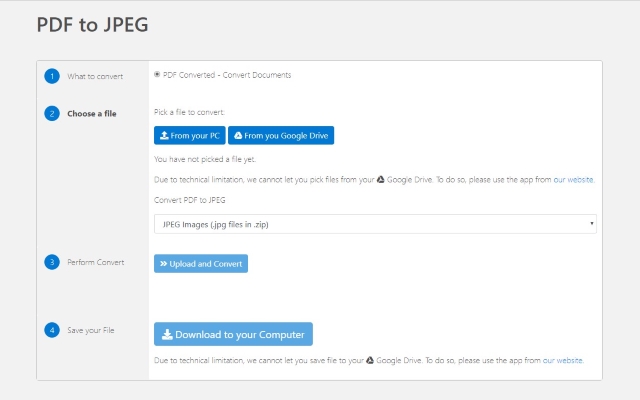
- Get your PDF files converted from PDF to JPG format instantly. You dont need to register to begin converting PDF to JPG. Our extension supports PDF conversion to JPG - Convert as many files as you want - Save your output files to either your computer/Google Drive Convert your PDF to JPG now and save it to either your local computer/Google Drive. This PDF to JPG service is 100% free.
Sponsored Link: