New Tab Page
Sponsored Link:
Welcome to New Tab Page
Thank you for installing and using our extension
Features:
Open a new tab adjacent to the current one: With just one click, you can open a new tab right next to the current one, making it easy to keep your tabs organized and accessible.
- Customizable hotkeys: You can set up hotkeys to quickly create a new tab to the left or right of the current one, giving you even more control over your browsing experience.
- Easy to use: Our extension is user-friendly and intuitive, so you can start using it right away without any hassle.
Here are some popular Chrome extensions that will make you more productive and help you save time.
- Grammarly
Grammarly is one of the most popular Chrome extensions out there, and for good reason: It's a spell checker with a proofreader that saves you from embarrassing typos and grammatical errors. It also helps you write more clearly by pointing out common mistakes and suggesting improvements for your writing style — all in real-time as you type.
- LastPass
LastPass is an essential password manager, as it allows you to store all your passwords securely in one place (and even sync them between devices). LastPass can also generate strong passwords for you, so you don't have to remember them yourself!
Tutorial:
- Install the Extension
-
After installing the extension, click on the icon
 on the toolbar.
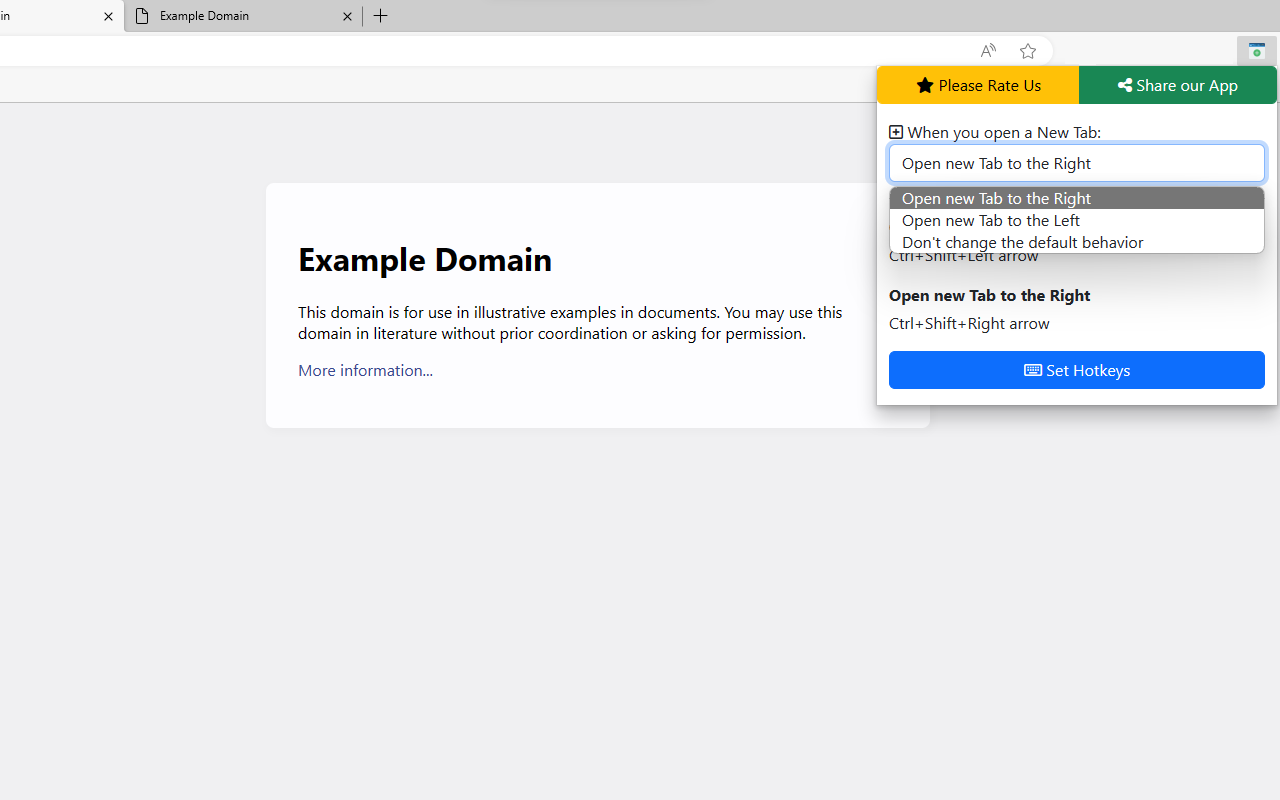
Open a new tab right next to the current one with just one click! Our extension makes it easy to keep your tabs organized and accessible. Say goodbye to the hassle of searching for the right tab among dozens of others. With our extension, you'll always know where your new tab is. Try it out today!
Here are some of the key features of your Chrome extension:
- Open a new tab adjacent to the current one: With just one click, you can open a new tab right next to the current one, making it easy to keep your tabs organized and accessible.
- Customizable hotkeys: You can set up hotkeys to quickly create a new tab to the left or right of the current one, giving you even more control over your browsing experience.
- Easy to use: Our extension is user-friendly and intuitive, so you can start using it right away without any hassle.
Sponsored Link: