Merge PDF Files
Sponsored Link:
Welcome to Merge PDF Files
Thank you for installing and using our extension
Features:
Merge your PDF files within minutes after you install this extension.
The first thing to note is that PDF files are made up of pages, and when you merge PDFs, the software will look for different pages across the two files, and create a new file with all of those pages.
If you want to merge two or more documents together into one document file, there are various ways to do this. One way is to use a desktop application such as Adobe Acrobat Pro DC or LibreOffice Draw.
With these programs, you can simply open each file at the same time and drag its pages onto your main document. You can also click 'merge' on your main document and choose which files you want to add to it.
How can you merge PDF files using a desktop application?
The primary reason to merge PDF files is to combine them into one larger document. This can be useful for all kinds of reasons, from combining multiple receipts into one document, to combining multiple documents into one.
The good news is that there are many ways to merge PDF files, both on the web and with desktop applications. In this article we will take a look at both options and show you how to merge multiple PDFs together.
How To Merge Multiple PDF Files On Your Computer
There are several different ways in which you can merge multiple PDF files on your computer. The first option is by using a free app called Combine PDFs (Mac). This app allows you to combine as many PDF files as you want until they reach 10MB in size or have 50 pages total. It supports merging two or more files at once and even lets you choose whether or not to use color tags when merging documents together. The only downside is that it only works on macOS computers and not Windows PCs or Linux machines
Tutorial:
- Install the Extension
- After installing the extension, click on the icon on the toolbar.
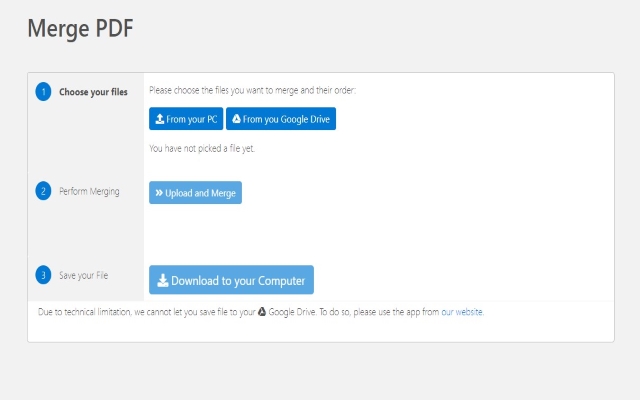
- Merge PDF Files now within Minutes! Fast and Easy Method to merge PDF files. Once you choose the PDF files you want to merge, simply choose whether to save your merged PDF file to your computer/Google Drive. It takes a minute to merge your PDF files and the merged PDF file is deleted from our servers within one hour. This software supports saving files directly to Google Drive.
Sponsored Link: