Open URLs in Bulk for Google Chrome™
Sponsored Link:
Welcome to Open URLs in Bulk for Google Chrome™
Thank you for installing and using our extension
Features:
There are two main ways to open many urls quickly:
Use the Ctrl + Shift + U shortcut to open all the links in a web page. This works on Windows and Linux, but not on Mac OS X.
Use the keyboard shortcuts for opening a link in a new tab or window. These work across all platforms.
If you are creating a PDF file and need to make a website link inside the PDF file, here is how you can do so.
In order to make a website link in Adobe Acrobat, you need to know how to use the anchor tag. The anchor tag is a HTML tag that allows you to create hyperlinks in your document.
The anchor tag has two parts: the opening tag and the closing tag.
The opening tag looks like this:
The closing tag looks like this:
Tutorial:
- Install the Extension
-
After installing the extension, click on the icon
 on the toolbar.
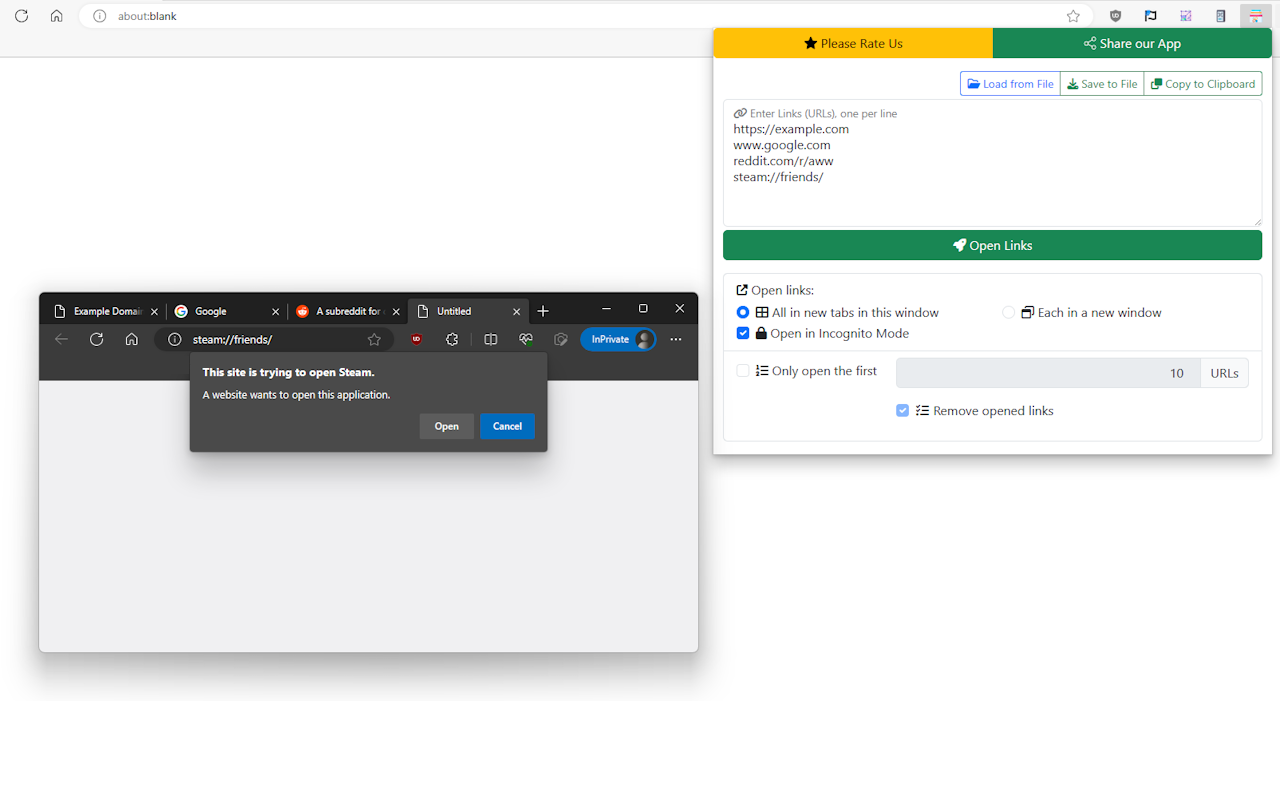
Quickly open multiple Web Links (URLs) with a single click.
- Effectively manage your links with files (Open, Save or Copy to Clipboard)
- Open Links (URLs) in new tabs or windows. You can also open them in Incognito window(s) as well.
- Open a limited number of Links from the list and optionally automatically remove them from the list.
- Smart URL fixing: protocol (like
https://) are optional sowww.example.comis translated into securehttps://www.example.com. - Smart protocols supported (for example,
steam://)
Sponsored Link: