Audio Recorder for Google Chrome™
Sponsored Link:
Welcome to Audio Recorder for Google Chrome™
Thank you for installing and using our extension
Features:
How do you use an audio recorder?
You can use an audio recorder to record meetings and presentations, or to capture the thoughts of your children or students as they work on projects. They're also great for recording music and other performances.
The benefits of using an audio recorder
There are many benefits to using an audio recorder. These include:
You can listen back to your recording at any time. If there's something you want to hear again or need clarification on, this can be done easily with a recording system.
You can also share your recordings with others online or over email if needed. This means that your recordings are not only stored locally on your system but also in other locations too.
Recording equipment allows users to record both sides of a conversation at once so they don't miss anything important while they're listening back to their recording later on.
If you want to install a desktop audio recorder software, here are some options below.
There are many audio recorder software available for Windows and Mac. Here are some of the most popular ones:
Audacity: This free and open source program is a favorite of many audio enthusiasts because it's easy to use, has great features and is available on Linux, Windows and Mac OS X. Audacity can record live audio or import digital audio files (such as MP3s) and edit them. You can trim or cut sections out of your recording, change their speed in real time, apply various effects like echo or amplification, and much more.
WavePad: WavePad is a powerful yet easy-to-use tool for editing audio files. It lets you perform tasks such as splitting recordings into smaller pieces, applying filters (like noise reduction), adjusting volume levels and much more. WavePad also supports a wide range of file formats including WAV, AIFF, MP3, OGG Vorbis and FLAC files among others.
Reaper: Reaper is an advanced digital audio workstation that allows you to record multiple tracks simultaneously from external sources such as microphones or guitar pickups using an audio interface. The software also includes built-in support for video playback so you can sync up your video with your music soundtrack by simply dropping in
Tutorial:
- Install the Extension
-
After installing the extension, click on the icon
 on the toolbar.
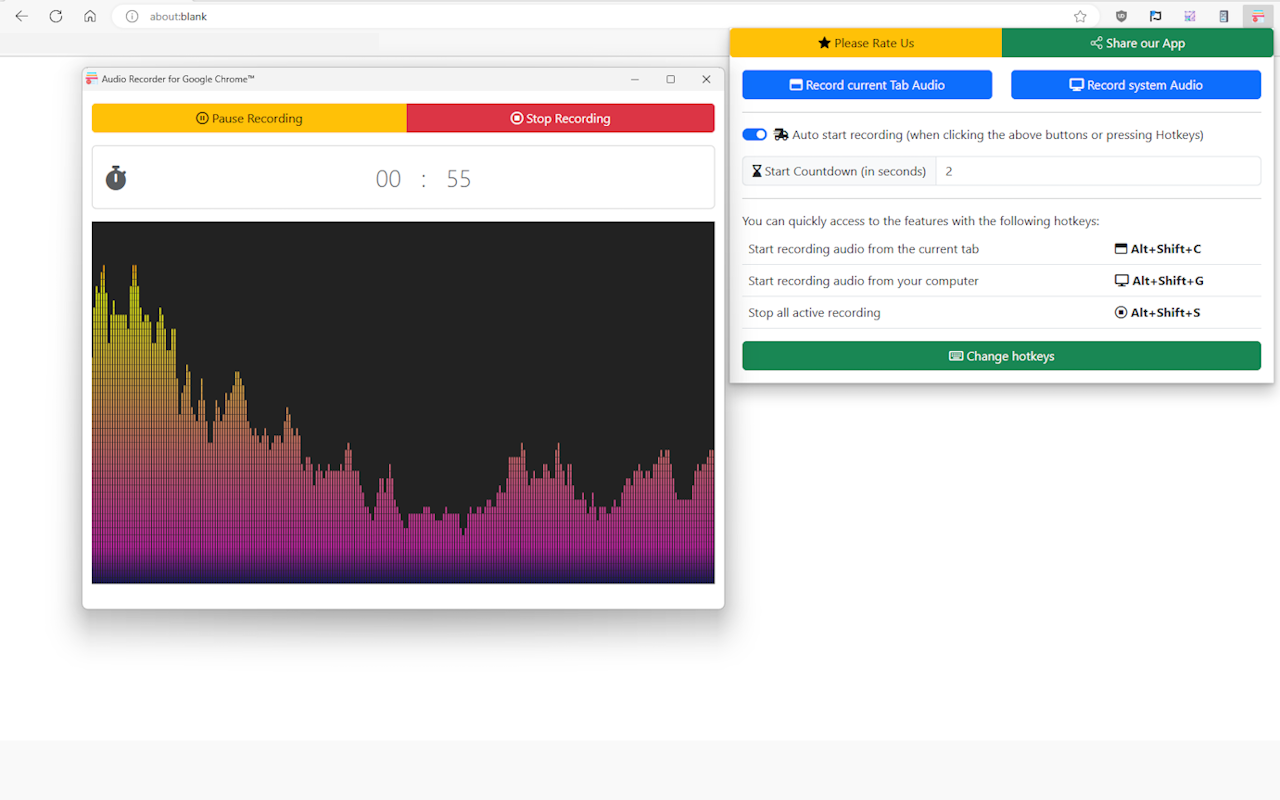
- Record Audio from a Tab or the whole system.
- Hotkeys for quick and convenient tasks.
- Countdown and Auto start ease the trouble of getting things ready.
Sponsored Link: